Using React Router out of the box is fairly simple. Add a <BrowserRouter> tag, all <Route> tags inside that, and then add path properties to define the URL parameters. /about for an about page, /contact for a contact page and so on.
But what happens when you need to make these URL parameters dynamic, for example to have a unique path for each news article or blog post that is published? There is a way, and I will explain how to do it in this article.
Parameters - what are they and naming convention
Parameters in React Router are just placeholders for dynamic content in the path property - similarly to how we use function parameters as a placeholder for data that we pass through to a function.
To signify a parameter in React Router, we use the colon. In the router, they look like this:
<Route path="/:gangMember" element={<GangMember />} />
How to access the dynamic parameter?...the useParams() hook!
useParams() is a very handy hook that is built into React Router. It returns an object with a mapping between the URL parameter and its value.
We can destructure this object to get our URL parameter that we have set to the end of our URL. For example, if I have my URL set as localhost:3000/maracuya, and then if I destructure the object that useParams() returns, then I can log just the parameter value, like this:
const { gangMemberUrlParam } = useParams();

console.log('gangMemberUrlParam', gangMemberUrlParam); // logs out 'gangMemberUrlParam', maracuya
How I made use of dynamic routing - creating unique URL parameters for my news pages
Using dynamic routing is essential when building a blog or news pages in React. Each article or post is going to be unique, and will need a unique URL parameter.
Setting up the path in the Router
A common routing pattern is to have a route for all news articles and then a route for each dynamic article. I do this in my router, having my path="/news" and then path="/news/articles/:newsArticle" underneath:
<Routes>
    <Route path="/" exact element={<Home />} />
    <Route path="/news" element={<NewsList />} />
    <Route path="/news/articles/:newsArticle" element={<Newspage />} />
    <Route path="*" element={<NotFound />} />
</Routes>
How to link to an individual article from the main /news page
My /news page contains a list of all of my news articles, with all of the news article content being pulled through from Contentful CMS. Each of these news articles need to be linked to their dynamic URL parameter, so that they can be accessed individually.
Luckily, Contentful makes this easy for us by providing a slug field. Within our content model in Contentful, we can add this field and make it required. Then, within the Content section for each individual blog post, we can add a unique slug which corresponds to the theme of the article.
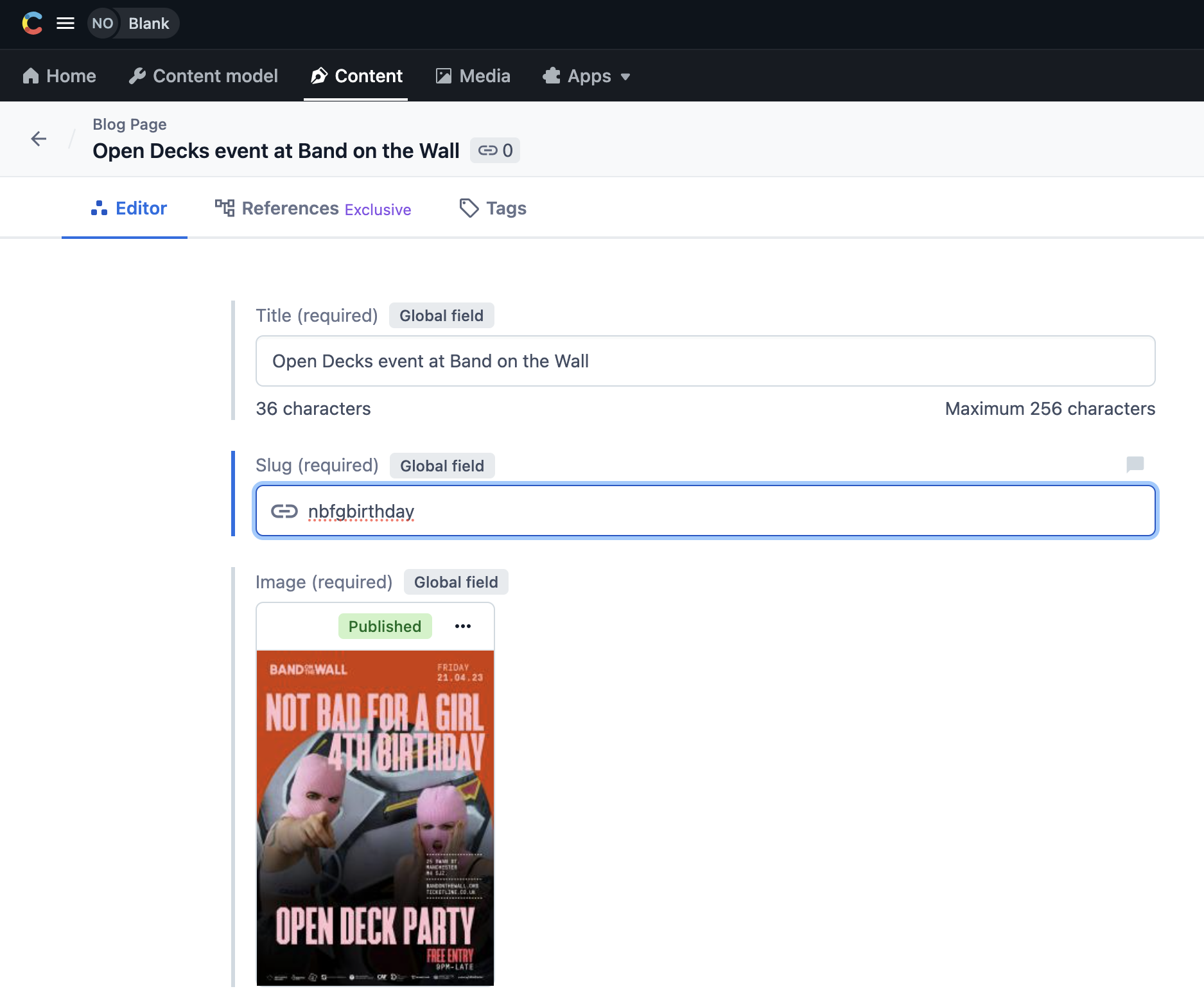
A custom slug added to an article about my DJ collective's birthday celebration
Once we have published that data within Contentful, we can pull it through to our code. We will first pull it through to a <Link /> tag rendered around each individual article in the news list. We can pull the slug through as the dynamic parameter in our <Link />'s to property, like so:
<Link
    type="button"
    className="news-list__button"
    to={`/news/articles/${post.slug}`}
    >
    // Article summary data in here - title, image, published date, summary and so on
</Link>
As long as the slug in Contentful is unique, then the data will be passed through correctly, the URL parameter will match and the article summary will link to the correct article on click.
Using the useParams hook and matching it with the Contentful slug to render the correct article
Once we have our list of articles linking to the slugs, we then need to figure out how to match each slug to the URL parameter of the article. We can do this with a combination of the useParams() hook, the useEffect() and useState() hooks, and the .find() method.
Use useParams() and destructure the URL parameter
First of all, we destructure our URL parameter just as I explained before:
const { newsArticle: newsArticleUrlParam } = useParams();
In this particular example, I rename my parameter to be newsArticleUrlParam because I will need to use newsArticle later on - I used the same name for my state.
Initialise the state of the news article
I initially set the state of my news article to be an empty object, since we are expecting an object, like so:
const [newsArticle, setNewsArticle] = useState({});
Implement a useEffect() hook
I then implement a useEffect() hook in which I will match the article and set it to the state.
Firstly, I get my newsPosts data object from Contentful and call the .find() method on it. I pass through each individual post, and if the post's slug in Contentful is equal to the URL parameter, then I will set that value to a variable called matchedArticle:
useEffect(() => {
    const matchedArticle = newsPosts.find((post) => post.slug === newsArticleUrlParam);
}, []);
I then set the state of the article to be the matchedArticle, every time the useEffect() runs. I also pass through the newsPosts data and the newsArticleUrlParam to the dependencies array, since this data will change every time the useEffect() runs:
  useEffect(() => {
    const matchedArticle = newsPosts.find((post) => post.slug === newsArticleUrlParam);
    setNewsArticle(matchedArticle);
  }, [newsPosts, newsArticleUrlParam]);
And there we have it, a working example of dynamic routing.
To summarise:
- Think of URL parameters the same you would as function parameters - you just need to add a colon too
- Accessing the URL parameter value from inside of the component that is rendered by React Router is done by using the
useParams()hook and then destructuring the object that is returned.